
IT Due Diligence: Best Practices and a Checklist for Good Measure
An IT due diligence checklist that asks for evidence, not yes/no answers, plus best practices and what IT DD misses when the target sells software.

Wilco van Duinkerken
CTO & Co-founder, X-Ray by Scaleflow

Ever had a target company’s SOC 2 report or ISO 27001 certificate before you that looked reassuring, then someone checked the scope and discovered that the certification covers corporate IT, while the production platform sits outside it?
It’s the kind of problem IT due diligence uncovers.
IT due diligence reviews a company's internal technology: infrastructure, business systems, vendor contracts, security controls, data management, and IT personnel. In M&A, it helps buyers assess whether those systems can support the business, what liabilities they carry, and how difficult post-deal integration will be.
Now, if it’s a software company we’re talking about, IT due diligence goes hand in hand with product and tech due diligence. This guide provides an evidence-based IT due diligence checklist and explains where a separate product evaluation becomes necessary.
What is IT due diligence?
Information technology due diligence is the assessment of a company's information technology and internal systems and operations before an investment or acquisition. It examines IT infrastructure, applications, contracts, the IT organization, security arrangements, and data controls.
The review helps buyers understand the condition of the target's IT environment and the work required after closing. That might involve migrating systems, replacing legacy applications, renegotiating vendor agreements, or separating the target from its parent company's infrastructure.
As for the scope, it depends on the transaction. An acquisition intended to produce cost savings through system consolidation calls for a different review from an investment in a company that will continue operating independently.
With that in mind, IT vs technical due diligence (the latter covering product) are two different reviews, since they examine different assets and answer different investment questions. Then, there’s cybersecurity due diligence, which focuses broadly on security.
| Review type | What it examines | Question it answers | Typical evidence |
|---|---|---|---|
| IT due diligence | Internal infrastructure, applications, vendors, IT personnel, security | Can the company's IT environment support operations and integrate with the buyer? | Network diagrams, contracts, asset registers, incident logs, IT budgets |
| Product and tech due diligence | Software architecture, codebase, scalability, IP, engineering team | Can the product support the growth plan, and does the company own and control its technology? | Repository analysis, architecture documentation, IP assignments, engineering metrics |
| Cybersecurity due diligence | Security risks across systems, applications, users, data, third parties | Can the company protect its information and services against relevant threats? | Penetration tests, vulnerability assessments, access logs, security reports |
These reviews can and likely will overlap, particularly around cybersecurity. As a rule of thumb, software acquisitions require both IT due diligence and a separate product and tech assessment.
For how product and tech due diligence runs inside a deal, see the tech due diligence process.
Why IT due diligence matters in M&A
IT due diligence helps buyers identify costs, contractual obligations, operational risks like key person dependencies, and other possible limits that may not appear in the financial statements.
Consider a company planning to integrate an acquisition into an existing group. The target uses a different ERP and cloud provider. Migrating those systems could require new licences, data migration, consultants, and months of work. In the end, the projected integration savings may look quite different once those costs enter the model.
Vendor agreements create another source of exposure. A contract may allow a supplier to terminate after a change of control, or require additional fees when/if the company joins a larger group.
Let’s not forget data protection. Under the GDPR, an acquisition or transfer of personal data can raise questions about lawful and fair processing, transparency, and the purposes for which information was collected. Buyers should establish what data the target holds and how it can be used after closing.
The NIS 2 directive may also apply, depending on the target's sector, size, and activities. It covers specified essential entities. Since it doesn’t cover every company that operates in technology, check the relevant national implementation and the target's actual activities before drawing any conclusions.
Finally, keep an eye on downtime history, as it can reveal operational risks. Repeated outages, failed backups, lengthy recovery periods, and similar issues could affect revenue and customer service even if the company has a spotless security record.
The IT due diligence checklist
For each area, ask three questions: what needs checking, what evidence supports the answer, and what would raise concern?
The idea is to use the following IT due diligence checklist as a starting point and adapt it to the target's size and transaction structure, along with the buyer's plans.
1. Infrastructure and hosting
Understand where the company's systems run, who operates them, and how much they cost. The review should cover cloud services, on-premises infrastructure, networks, and dependencies on external hosting providers.
| Check | Evidence to request | Red flag |
|---|---|---|
| Cloud and on-premises infrastructure, hosting providers, dependencies | Infrastructure inventory, hosting agreements, architecture diagrams | No reliable inventory or undocumented production dependencies |
| Network architecture, critical systems | Network diagrams, asset register, access documentation | Unsupported infrastructure or poorly documented dependencies |
| Cloud expenditure, cost trends | Monthly invoices, cost reports, cloud spend as a percentage of revenue | Cloud costs growing faster than revenue without a clear explanation |
2. Systems and applications
Map the applications employees use to run the business, including ERP, CRM, financial systems, HR software, and legacy applications.
| Check | Evidence to request | Red flag |
|---|---|---|
| Core applications and ownership | Application inventory, system owners, renewal dates | Business-critical systems without identifiable owners |
| Legacy systems, dependencies | System documentation, maintenance records, support agreements | Unsupported software running essential processes |
| Shadow IT, unsanctioned AI tools | Software discovery reports, expense records, AI usage policies | Confidential company or customer data entered into unapproved AI services |
Pay particular attention to apps introduced by individual departments. From separate databases to AI assistants, there are plenty of tools that can create security and privacy problems.
3. Vendor contracts and software licences
Take a look at what the company has purchased and uses, and whether agreements can survive a change of ownership.
| Check | Evidence to request | Red flag |
|---|---|---|
| Change-of-control and assignment provisions | Full contracts, amendments, critical supplier register | Key vendor can terminate or renegotiate after closing |
| Software licence compliance | Licence inventory, purchase records, vendor audit correspondence | Unlicensed installations, excess users, unresolved audit findings |
| Renewals, future commitments | Contract register, renewal calendar, minimum-spend obligations | Automatic renewals, substantial unused commitments |
Go beyond subscription fees. Enterprise agreements can include minimum user numbers, consumption thresholds, annual price increases, and other stipulations. Licences may also be non-transferable or incompatible with the buyer's existing arrangements.
4. Security controls
Certifications provide useful evidence, but buyers should establish exactly what they cover.
| Check | Evidence to request | Red flag |
|---|---|---|
| SOC 2 and ISO 27001 coverage | Reports or certificates, scope statements, exclusions, validity dates | Production systems excluded from the certification scope |
| Vulnerability management | Latest penetration-test report, vulnerability register, remediation records | Significant findings remain unresolved |
| Access management and encryption | Privileged-account register, access reviews, encryption standards | Former employees retain access or sensitive data lacks appropriate protection |
| Security incidents | Incident register, post-incident reviews, response procedures | Repeated incidents without documented corrective action |
Neither SOC 2 nor ISO 27001 automatically cover every system the company operates. So, ask which production environments and services fall within the assessment.
5. Data management and privacy
Establish what information the target collects, where it’s stored, who can access it, and how long it’s retained.
| Check | Evidence to request | Red flag |
|---|---|---|
| Types of data collected | Data inventory covering customer, employee, financial, operational, and other sensitive data | The company can’t identify what personal or sensitive data it holds |
| Data locations and storage | Data inventory, data-flow diagrams, hosting locations | Sensitive information stored in unknown or unapproved locations |
| Retention and deletion | Retention policy, deletion logs, backup settings | No defined retention periods or inability to delete data when required |
| Privacy compliance and third-party processing | Records of processing activities, privacy notices, data processing agreements | Missing processor agreements or undocumented international transfers |
For GDPR-regulated businesses, check whether documented processing activities reflect actual practices. Furthermore, establish whether the acquisition changes the legal basis or parties involved in processing personal data.
6. Business continuity and disaster recovery
Ask for evidence of restoration exercises, since a written disaster recovery policy doesn’t demonstrate that a company can recover its systems.
| Check | Evidence to request | Red flag |
|---|---|---|
| Backup frequency and coverage | Backup schedules, system coverage reports, retention settings | Critical systems or data excluded from backups |
| Recovery testing | Restore-test records, results, corrective actions | Backups exist, but nobody has demonstrated they can be restored |
| Recovery objectives and downtime | Recovery time objective (RTO) and recovery point objective (RPO) targets, outage logs, incident reviews | No defined recovery targets or actual recovery times consistently exceed them |
Request the latest recovery-test results and check whether actual performance meets the agreed targets.
7. IT organization and people
Identify who owns each critical system, who has administrative privileges, and which responsibilities sit with external contractors.
| Check | Evidence to request | Red flag |
|---|---|---|
| IT organization and responsibilities | Organization chart, role descriptions, outsourced-service register | Critical responsibilities have no named owner |
| Key-person dependencies | Responsibility matrix, handover documentation, succession arrangements | One person holds undocumented knowledge of essential systems |
| Administrative access | Privileged-user register, access reviews and records | Shared administrator credentials or former contractors with active access |
Be sure to include outsourced personnel. A small internal IT team may depend on an external provider for backups, network administration, security monitoring, and other processes. The goal is to establish what happens if that relationship ends.
8. IT spend
Review current spending and future commitments to understand the cost of maintaining the environment and supporting the buyer's plans.
| Check | Evidence to request | Red flag |
|---|---|---|
| Operating and development expenditure | IT budget, general ledger breakdown, run-versus-change allocation | Spending can’t be separated into maintenance and improvements |
| Contractual commitments | Vendor payment schedules, multi-year agreements | Significant future commitments missing from forecasts |
| IT costs relative to company size | IT spend per employee, historical trends, budget forecasts | Material spending increases without a business explanation |
A low IT budget may reflect efficiency (and thus, a positive sentiment), but it can also indicate deferred maintenance or insufficient investment in security. Hence, separate run costs, which maintain existing systems, from change costs, which fund upgrades, migrations, and new capabilities.
9. Integration or carve-out readiness
The requirements depend on the deal structure. An acquisition within an existing group differs from a transaction in which the target must separate from its parent.
| Check | Evidence to request | Red flag |
|---|---|---|
| Parent-company dependencies | System dependency maps, service ownership records | Critical services have no separation plan |
| Transitional service agreements | Proposed TSA, service descriptions, pricing, exit timelines | No agreement covering services; the target can’t yet operate independently |
| Systems to integrate, retain, or retire | Integration roadmap, migration estimates, application rationalization plan | Integration assumptions lack clarity regarding owners, costs, or realistic timelines |
A transitional service agreement (TSA) allows the seller to continue providing services to a divested business for an agreed period after closing. This might cover hosting, identity management, finance systems, or IT support. So, identify every dependency that must remain in place until the target can operate independently.
What IT due diligence for software companies won't tell you
In case a software company caught your eye, IT due diligence leaves a significant part of the investment question unanswered.
It’s part of the reason why you might notice IT vs technical due diligence queries on the internet. But for the most part, it’s because a target might have well-managed internal systems and an acceptable security posture, but its product could still have architectural limitations, expensive technical debt, ownership problems hidden inside the codebase, or some other malady.
For that reason, there needs to be a separate product and technical due diligence checklist for software targets that covers these five segments:
| What IT due diligence misses | Why it misses it | What to check instead |
|---|---|---|
| Product architecture and scalability | Internal infrastructure diagrams don't establish whether the product can handle forecast growth | Product architecture, dependencies, bottlenecks, load-test evidence |
| Code quality and technical debt | Doesn’t examine the product's implementation (generally inventories systems) | Codebase, test coverage, dependencies, engineering practices |
| IP ownership inside the codebase | Corporate asset records may not establish ownership of every software contribution | Code contributions, employment and contractor agreements, IP assignments |
| Key-person risk in engineering | IT organization chart doesn't show who understands the product's most important components | Contribution patterns, documentation and knowledge concentration |
| AI defensibility | Inventory of approved AI tools doesn’t say much about the product's technical advantage | Proprietary data, model integration, evaluation processes, product architecture |
If there’s anything that deserves particular scrutiny, it’s IP ownership. Imagine a scenario where a former contractor has built an entire product module without signing an agreement that clearly assigns the relevant IP. That can affect what the buyer is acquiring.
To that point, AI businesses bring another valuation question mark. It’s common for a working application to depend (sometimes heavily) on third-party models and standard APIs. Thus, the investor needs to understand what the company owns and pays others to access, as well as what competitors could reproduce.
For what the resulting product and tech report should contain, see what a technical due diligence report actually covers.
IT due diligence best practices
As said before, the checklist is the starting point. Provided you frame the questions correctly, the quality of the assessment will largely depend on what evidence is collected and how findings feed into the transaction.
Here are a few IT due diligence best practices to help you on your way:
1. Scope the review against the deal thesis
If an acquisition is focused on integration, it calls for detailed information about shared and overlapping applications and migration costs. At the same time, a carve-out requires closer attention to parent company dependencies and TSA arrangements, whereas a standalone investment begs for greater attention to independent operations.
2. Start with your own IT environment
In the event an integration is planned, map your own critical infrastructure and contracts first. From there, compare them with the target's systems to identify realistic consolidation opportunities and potential compatibility problems.
3. Ask for evidence, not yes/no answers
An IT due diligence questionnaire helps organize the process, but it shouldn’t be the final word. If the target says backups are tested regularly, request the latest restoration report. If it claims strong access controls, examine privileged account lists and access reviews.
4. Check certification scope
Request the full SOC 2 report or ISO 27001 certificate, including exclusions and scope. If production systems are outside the assessment, ask for separate security evidence.
5. Interview the people who operate the systems
Speak with system administrators, application owners, security personnel, and external providers where appropriate. Ask what breaks most often, if there are any system peculiarities, which processes require manual intervention, and what would happen if a particular person or supplier became unavailable.
6. Put costs and timelines against findings
Estimate the work required to resolve material issues and the time before the business can operate as planned. Separate immediate remediation from longer-term improvements.
7. Identify integration blockers before signing
Review critical vendor agreements, data transfer restrictions, parent company dependencies, and personnel arrangements early enough (during confirmatory due diligence) to influence transaction documents. Some issues may require amendments or a TSA.
8. Run product and tech due diligence early for software targets
Product architecture, code ownership, security, and engineering capability can affect not only the price and investment conditions, but also capital required after closing. Run product and tech due diligence before the term sheet, where possible. At the very least, complete it before the investment committee makes its final decision.
How Scaleflow fits into the due diligence process
Once you've gauged how the target's IT supports its day-to-day operations, you have to figure out whether its software product can support the business you're investing in.
You’ll be pleased to hear that Scaleflow's X-Ray covers product and tech due diligence, from the software product and its codebase to the engineering team. It doesn't assess back-office IT, vendor contracts, internal business systems, or any other areas that remain part of your IT due diligence.
The distinction between technical quality and operational readiness can make all the difference in practice.
For example, ICOS Capital uses Scaleflow to evaluate whether deeptech companies can support the growth their investment cases assume. Its assessments look at scalability, security, compliance, and organizational discontinuities that could become obstacles to growth. As a result, the findings give investors concrete issues to address before closing.
X-Ray scans the entire codebase, with every finding reviewed and verified by experienced software operators. The target provides read-only repository access (here’s how we handle repository access), and the process takes about 30 minutes of the target's time.
Within one business day, the deal team receives two reports: an IC-ready summary and a full technical report.
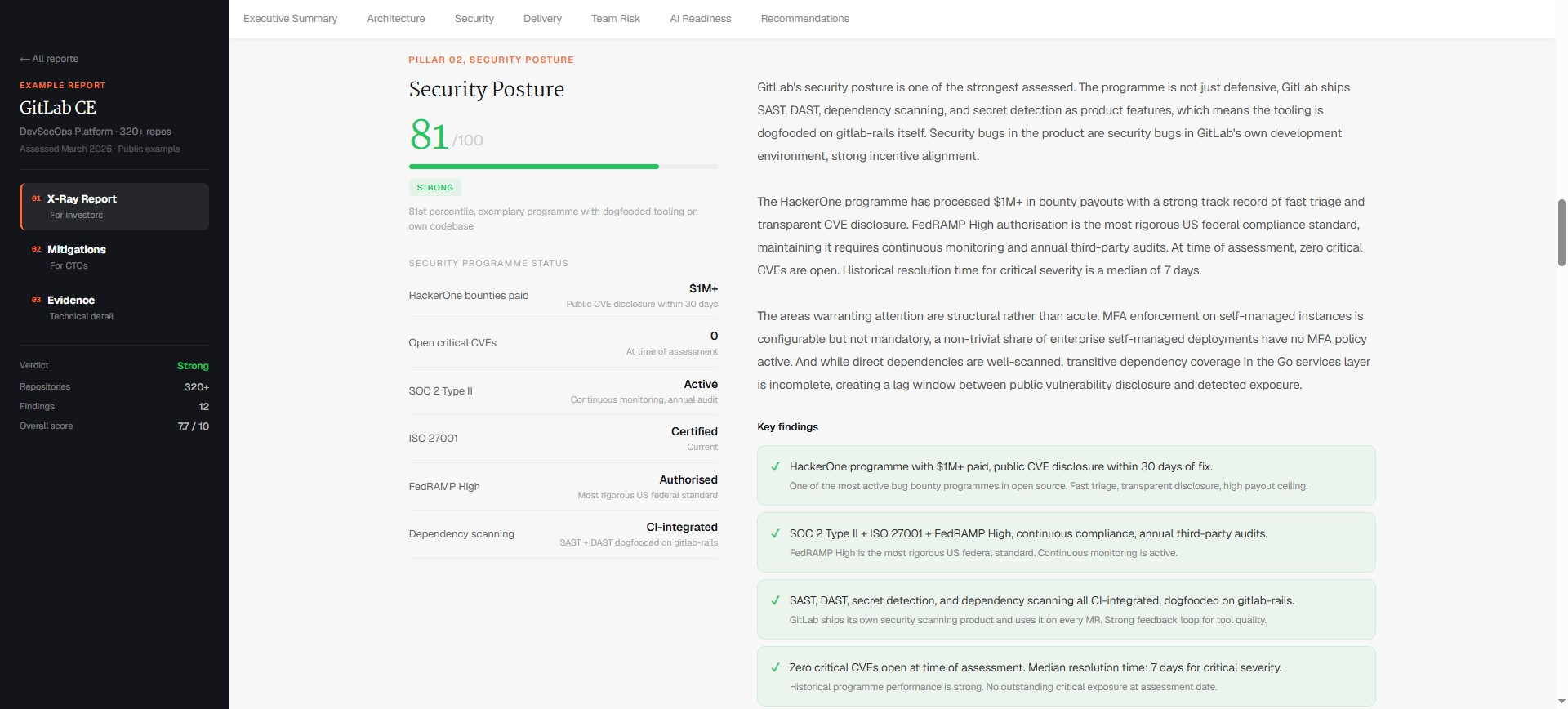
So, run an X-Ray alongside your IT due diligence to give the investment committee both perspectives: whether the company can operate effectively and whether its product can support the investment plan.
FAQs about IT due diligence
What does IT due diligence include?
IT due diligence typically covers infrastructure and hosting, business applications, vendor contracts, software licences, security controls, data management, business continuity, IT personnel, and technology spending. For M&A transactions, it also examines integration or carve-out requirements. The scope depends on the target's size and the buyer's plans after closing.
What's the difference between IT due diligence and technical due diligence?
IT due diligence inspects the systems a company uses to operate, including infrastructure, internal applications, vendors, and security. Technical due diligence in a software investment examines the product itself: architecture, code quality, scalability, IP ownership, and the engineering team. Software acquisitions generally require both assessments.
How long does IT due diligence take?
IT due diligence takes several weeks within the wider M&A due diligence period. The timeline depends on the target's size, number of systems and suppliers, documentation quality, and integration requirements. A complex carve-out or fragmented IT environment may require additional investigation.
Who performs IT due diligence?
IT due diligence is normally performed by the buyer's internal IT leadership, specialist advisory firms, or independent technology consultants. Larger transactions may involve specialists covering infrastructure, cybersecurity, data protection, and software licensing. The deal team coordinates their findings with legal and financial advisers.
Is IT due diligence necessary for non-tech companies?
Yes. Companies across most industries depend on internal systems, cloud services, software licences, and third-party IT providers. A manufacturer, retailer, or logistics business can face significant integration costs, data exposure, or operational disruption if its IT environment is poorly understood before an acquisition.
Does a SOC 2 or ISO 27001 certificate replace IT security due diligence?
No. Both provide evidence of defined security controls, but their coverage has limits. Buyers should examine the report or certificate's scope, assessment period, exclusions, and outstanding findings. They should also request penetration-test results, remediation records, access reviews, and incident history.
Services
Keep reading
Related articles
Tech due diligence process in M&A: The ultimate guide
The tech due diligence process step by step: what each stage covers, who’s involved, how long it takes, and how findings turn into deal terms in M&A.
Due diligence for vibe coded startups: What to check before you invest
Due diligence for vibe coded startups: seven checks on defensibility, ownership, control, security, scale, delivery and cost, with the red flags and what each means for the deal.
What Does a Technical Due Diligence Report Actually Cover?
What a technical due diligence report covers: the investor summary, the full technical report, six areas of evidence, and how to tell a useful report from a box-ticking one.
Start with an X-Ray.
1 business day. The complete picture. 300+ assessments delivered.